Brainfart
A mobile brain-training app built around nostalgic 1950s-70s trivia and memory games for older adults.
Are you the maker? Claim this listing to keep info, pricing and screenshots current. Verified via your tool's domain email.
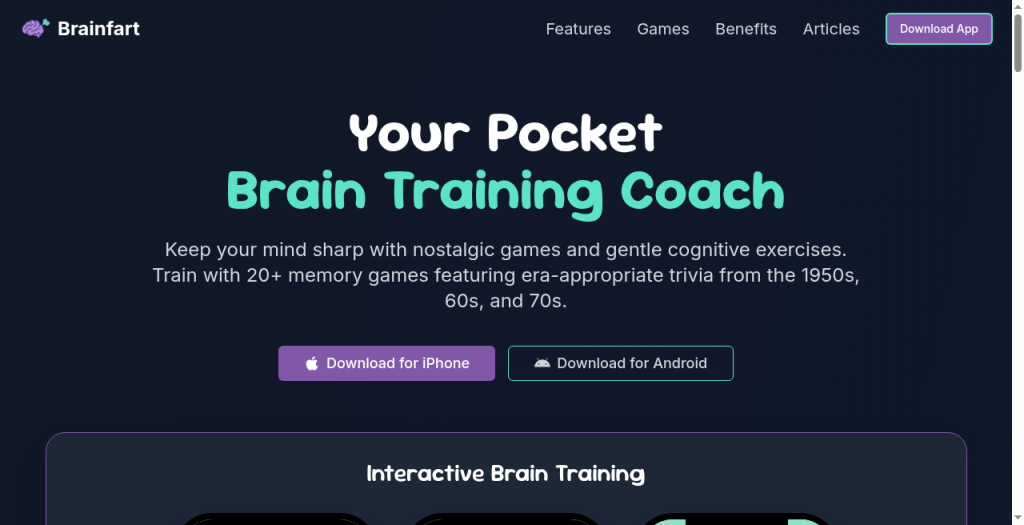
Brainfart is the clearest choice for older adults who want low-pressure cognitive exercise wrapped in familiar cultural references from the mid-20th century. Its $24.99/year plan is genuinely affordable, but the AI layer is thin compared to dedicated cognitive-health platforms that publish clinical validation. Anyone expecting research-grade brain training or a broad game library beyond the senior-nostalgia niche should look elsewhere.
What is Brainfart?
Brainfart is a pocket brain-training app for seniors and older adults who enjoy nostalgic games and gentle cognitive exercises. It offers 20+ memory games using familiar trivia from the 1950s, 60s, and 70s, plus face recognition, story recall, visual memory, and everyday recall challenges. Its personalized training uses adaptive difficulty and spaced repetition to adjust challenge levels and reinforce practice over time, providing an AI-assisted component grounded in the live site's training workflow. Large text, high contrast modes, text-to-speech, simple navigation, offline access, daily brain scans, progress tracking, Memory GPA scoring, streaks, and analytics support accessible independent use. Brainfart is designed for older adults seeking enjoyable cognitive wellness and nostalgia-based brain training, not for children or K-12 education.
How we scored Brainfart
Capability scores in the mid-teens because the 20-plus game library is real but narrow, the AI layer is described only as adaptive difficulty with no published model or independent validation, and the ADHD and IQ assessment features make clinical-sounding claims without any documented clinical backing. Ease of use scores high at 20 because the accessibility-first design (large text, high contrast, text-to-speech, offline mode) is genuinely well-considered for the target audience and onboarding friction on a free-download mobile app is low. Value scores 19 because the $34.99 lifetime option is an unusually fair deal for a subscription-heavy category, and the $24.99/year plan is competitive. Delivery drops to 8 because the app makes health-adjacent claims (ADHD screening, IQ testing, cognitive function analysis) with no published validation, no clinical partnerships, and no regulatory disclaimers found in any available source, which is a meaningful trust problem for a product targeting a vulnerable demographic.
Pros and cons
What we liked
- Lifetime access for a one-time $34.99 payment makes the total cost of ownership unusually low for a subscription-heavy category.
- Accessibility features (large text, high-contrast modes, text-to-speech, offline play) are built in from the start, not bolted on as an afterthought.
- The nostalgia-anchored content design is a genuine differentiator: era-specific trivia from the 1950s-70s reduces cognitive load for older users who find abstract puzzle apps alienating.
Where it falls short
- The ADHD screening and IQ testing features carry clinical-sounding labels but the site publishes no independent validation, peer-reviewed studies, or clinical partnerships to back those specific assessments, which is a meaningful credibility gap for health-adjacent claims.
- The app is mobile-only (iOS and Android); there is no web app, desktop client, or tablet-optimized layout listed, which limits use for older adults who prefer larger screens or keyboards.
- The free tier's game selection is unspecified in scope, making it hard for a prospective user to evaluate how much value they get before committing to a paid plan.
Key features
Brainfart pricing
Free to download with a selection of free games and no ads. Premium enables the full library via a $5.99/week plan, a $24.99/year plan, or a one-time $34.99 lifetime purchase.
| Plan | Price | Who it is for |
|---|---|---|
| Free | Free | A selection of memory games with unlimited plays and no ads. Full game library and premium features are not included. |
| Weekly | $5.99/week | Full access to all games and premium features, billed weekly. Renews automatically after any trial period. |
| Yearly | $24.99/year | Full access to all games and premium features, billed annually. Renews automatically. |
| Lifetime | $34.99 | One-time payment for permanent full access to all games and premium features, with no recurring charges. |
Pricing reflects what we saw at time of review (2026-09). Always confirm current pricing on the tool's own site.
Who should use Brainfart?
Brainfart fits a specific person well: a retiree or older adult in their 60s, 70s, or 80s who wants a low-stakes daily habit, finds abstract puzzle apps cold or confusing, and responds to the warmth of familiar cultural touchstones. The large-text interface and offline mode make it practical for users with limited tech confidence or patchy internet access. Family members looking for a gift-style app for an aging parent will find the one-time $34.99 lifetime purchase an easy sell.
Anyone outside that demographic should think carefully before downloading. The trivia and cultural references are deliberately era-specific, so younger users will find the content thin. Users who want clinically grounded cognitive assessment should look at dedicated platforms with published peer-reviewed validation. Within our directory, Notion AI is a better fit for productivity-minded users who want AI assistance integrated into their actual work rather than a standalone wellness app.
Skip it if: Users seeking clinically validated cognitive assessments or a broad, age-agnostic game library.
Brainfart alternatives
Frequently asked questions
Is there a free version of Brainfart?+
Yes. The app is free to download on iOS and Android and includes a selection of games with unlimited plays and no ads. The full library of 20-plus games requires a paid plan.
What does the lifetime plan cost and what does it include?+
The lifetime plan is a one-time payment of $34.99 and gives permanent access to all games and premium features with no recurring charges.
Is the ADHD screening or IQ test clinically validated?+
The app describes these as cognitive wellness assessments with personalized insights, but the site does not publish peer-reviewed validation or clinical partnerships for these specific features. Treat them as self-guided wellness tools, not diagnostic instruments.
Does Brainfart work offline?+
Yes. The app includes offline capabilities, which is specifically useful for older users in areas with unreliable internet or for use during travel.
What age group is Brainfart designed for?+
The app targets older adults, with trivia and cultural references drawn from the 1950s, 60s, and 70s. The accessibility features (large text, high contrast, text-to-speech) reinforce this focus. Younger users will find the content narrow.
Is Brainfart available on desktop or as a web app?+
No. As of the review date, Brainfart is a mobile-only app available on iOS and Android. There is no listed web or desktop version.
More AI Productivity Tools
See all categoriesGet your tool listed on 300+ directories.
One listing here is a strong start. But the founders who get discovered everywhere are listed everywhere. Our sister site, Free AI Directories, submits your tool to 300+ AI directories for you, every single one by hand, by a real person.
It is a one-time payment of $49, no subscription, and you can follow along as the submissions land. Prefer the slow route? The same site keeps a free list of 450+ directories you can work through yourself.
Get my tool listed on 300+ directoriesOne-time payment, no subscription · 100% human submissions · Free list of 450+ directories included.